
WhatsApp Sipariş Sistemi
WhatsApp'tan Kolay ve Hızlı Sipariş Alın
Müşterilerinizin alışık olduğu WhatsApp üzerinden sipariş alın. Ekstra uygulama indirmelerine gerek kalmadan menünüze ulaşmalarını, siparişlerini oluşturmalarını ve size doğrudan iletmelerini sağlayın.
Kendi markanızla, kendi sipariş sisteminiz üzerinden komisyonsuz sipariş alın.
- Uygulama indirmeye gerek yok
- Kendi markanızla sipariş alın
- Komisyonsuz sipariş
- Kurulum desteği bizden
WhatsApp yemek sipariş otomasyonu akışı
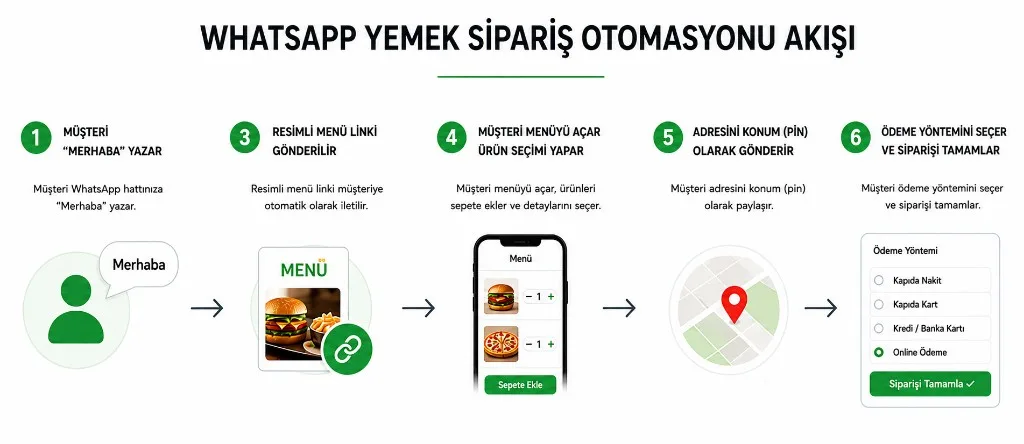
Müşterileriniz WhatsApp'tan Ulaşsın, Siparişini Kolayca Versin
WhatsApp Sipariş Sistemi, müşterilerinizin işletmenize WhatsApp üzerinden ulaşarak online menünüzü görüntülemesini ve siparişini kolayca oluşturmasını sağlar.
Müşteriniz uzun uzun mesajlaşmak, ürünleri tek tek yazmak veya siparişini telefonla anlatmak zorunda kalmaz.
Menünüz, ürünleriniz, fiyatlarınız ve sipariş adımları hazır şekilde karşısına çıkar.
Müşteriniz için kolay, işletmeniz için daha düzenli bir sipariş süreci.
Müşteriniz Yeni Bir Uygulama İndirmek İstemiyor
Bir sipariş vermek için yeni bir uygulama indirmek, üyelik oluşturmak veya farklı bir platforma alışmak herkes için cazip olmayabilir.
WhatsApp ise müşterilerinizin zaten kullandığı ve alışık olduğu bir iletişim kanalıdır.
Bu nedenle müşterinizin karşısına yeni bir engel çıkarmadan, alışık olduğu kanal üzerinden sipariş sürecini başlatabilirsiniz.
Uygulama Yok
Ekstra uygulama indirmeye gerek kalmadan sipariş süreci.
Hızlı Sipariş
Müşteri menüye ulaşır, ürünlerini seçer ve siparişini oluşturur.
Kolay Kullanım
Alışık olduğu WhatsApp üzerinden işletmenize ulaşır.
Kendi Sipariş Kanalınız
Siparişleri doğrudan kendi sisteminiz üzerinden alın.
Komisyonsuz
Kendi kanalınızdan aldığınız siparişlerde pazaryeri komisyonlarına bağlı kalmayın.
WhatsApp'tan Sipariş Alıyorsunuz. Peki Daha Kolay Olabilir mi?
Manuel yöntem
- Müşteri: “2 hamburger, 1 kola olsun.”
- İşletme: “Hangi hamburger?”
- Müşteri: “...”
- İşletme: “Adresinizi alabilir miyim?”
Bu şekilde devam eden mesaj trafiği.
Sistem ile
- Menü
- Ürün seçimi
- Sepet
- Adres
- Ödeme
- Sipariş
Daha az mesajlaşma. Daha düzenli sipariş. Daha kolay operasyon.
Sipariş Süreci Müşteriniz İçin Çok Basit
-
01
WhatsApp'tan Ulaşır
Müşteriniz işletmenizin WhatsApp hattına ulaşır.
-
02
Menünüze Geçer
Sipariş için menünüze yönlendirilir.
-
03
Ürünlerini Seçer
Ürünlerini, seçeneklerini ve adetlerini belirleyerek sepetini oluşturur.
-
04
Siparişini Tamamlar
Adres ve teslimat bilgilerini girer, uygun ödeme yöntemini seçer.
-
05
Sipariş Size Ulaşır
Sipariş işletme paneliniz üzerinden size ulaşır ve sipariş sürecini yönetebilirsiniz.
- Menü
- Sepet
- Ödeme
- Sipariş
WhatsApp'tan Sipariş Almanın İşletmenize Faydaları
Daha Kolay Sipariş
Müşteriniz alışık olduğu kanal üzerinden sipariş verir.
Daha Az Mesaj Trafiği
Sipariş bilgileri sistem üzerinden düzenli şekilde alınır.
Kendi Müşteriniz
Sipariş kanalınız işletmenizin kendi markası altında çalışır.
Komisyonsuz Sipariş
Kendi sipariş kanalınız üzerinden doğrudan sipariş alın.
Daha Profesyonel Deneyim
Müşterinize sadece mesajlaşma değil, düzenli bir online sipariş deneyimi sunun.
Tek Panelden Yönetim
Siparişlerinizi sistem üzerinden takip edin.
Üstelik Sipariş Almanın Tek Yolu WhatsApp Değil
WhatsApp üzerinden sipariş almakla kalmayın.
Müşterilerinize işletmenize özel sipariş linkinizi de sunabilir, QR kodunuzu kullanarak menünüze kolayca ulaşmalarını sağlayabilirsiniz.
WhatsApp + Link + QR Kod
Üç farklı erişim noktası, tek sipariş sistemi.
3 Farklı Şekilde Sipariş Alın
WhatsApp'tan Sipariş
Müşterileriniz alışık oldukları WhatsApp üzerinden sipariş sürecine ulaşabilir.
Link ile Sipariş
İşletmenize özel sipariş bağlantınızı Instagram, Google, web siteniz veya istediğiniz başka bir yerde paylaşabilirsiniz.
QR Kod ile Sipariş
QR kodunuzu masalara, kasaya, paketlere veya işletmenizin farklı noktalarına yerleştirerek müşterilerinizi doğrudan menünüze yönlendirebilirsiniz.
WhatsApp, sipariş linki ve QR kod tek sipariş sisteminde
Tek Menü · Tek Panel · Tek Sipariş Sistemi
Kendi Markanızın Sipariş Sistemi
Müşteriniz nerede olursa olsun sipariş kanalınız hazır. WhatsApp, Instagram, Google, masa, paket ve web siteniz aynı sisteme bağlanır.
Müşteriniz size mesaj gönderir.
Profilinizdeki sipariş linkine tıklar.
İşletme profilinizden sipariş bağlantısına ulaşır.
Restoran Masası
QR kodu okutur.
Paket & Broşür
Kutu veya broşür üzerindeki QR kodu tarar.
Web Siteniz
“Online Sipariş” butonuna tıklar.
Ücretsiz Kuralım, Ücretsiz Deneyin, Kararı Siz Verin.
Menünüzü bize gönderin, WhatsApp sipariş sisteminizi sizin için hazırlayalım.
Sisteminizi deneyin, müşterilerinizden sipariş almaya başlayın.
- Kurulum ücretsiz
- Menü kurulumu desteği
- WhatsApp sipariş
- Özel sipariş linki
- QR Menü kullanım süresince ücretsiz
- 7 gün ücretsiz deneme
Menünüzü gönderin, kurulumu biz yapalım.
Online Sipariş Sistemi
1.000 ₺ + KDV
/ Ay
veya
9.900 ₺ + KDV
/ Yıl
QR Menü: Kullanım süresince ücretsiz
Ödeme ve üçüncü taraf entegrasyonları ayrıca ücretlendirilir.
Sıkça Sorulan Sorular
WhatsApp üzerinden nasıl sipariş alınır?
Müşterinin uygulama indirmesi gerekir mi?
WhatsApp sipariş sistemi ile normal WhatsApp siparişi arasındaki fark nedir?
Müşteriler online ödeme yapabilir mi?
Siparişler nereden takip edilir?
Menü kurulumu nasıl yapılır?
Bana özel sipariş linki oluşturuluyor mu?
QR kod ile sipariş alabilir miyim?
QR Menü ücretsiz mi?
WhatsApp, link ve QR kod aynı sistemde kullanılabilir mi?
WhatsApp'tan Sipariş Almaya Bugün Başlayın
Müşterilerinizin zaten kullandığı kanaldan sipariş alın.
Menünüzü gönderin, sisteminizi biz kuralım.